Description
This screen allows the program to take advantage of login procedures that visitors to the calendar may have already completed. For example, if a visitor to your calendar has already logged in to your website or has already logged in to the operating system why ask them to log in again to a calendar?
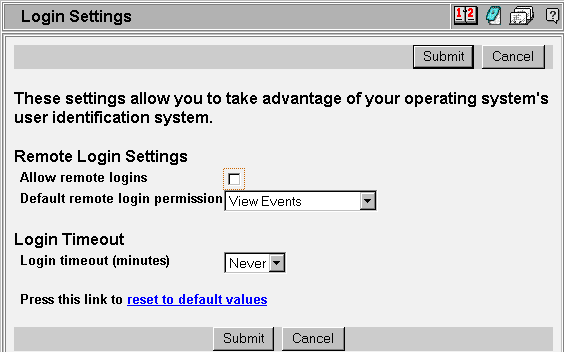
Each field is described below:
Allow remote logins: If checked then the procedure described below will take effect when the user accesses the calendar program.
Default remote login permission: If Allow remote logins is checked and the visiting user is not found with a specific record in our internal user database then this permission level is given to that user. This is different than the default permission given to user that are not remotely logged in.
Login timeout (minutes): So that a person may not leave their browser open while logged in (allow someone else to come along and make changes under that user id) you may set a system wide setting to automatically log users out if they have not accessed the program in a given time. You may also set this value to Never so that the calendar is never automatically logged out.
How permissions are calculated
Following is a discussion of how the permission level is chosen for any particular visitor to any particular calendar (the decision process is Red --> Green --> Blue):
| Allow remote logins is NOT checked (1) |
|
||||||||
| Allow remote logins is checked |
|
||||||||
If allow remote logins is not checked the program acquires a user's permission from only one source -- the internal user database.
If allow remote logins is checked then if the user has gotten to the calendar web page without having logged in to either the web server or operating system then the user permission is acquired from the user database (as usual). However, if the user has already logged in to the website or operating system the program uses that information.
If the user has logged in to the website or OS then if the user is also found in the internal user database then the permission given the user is that found in the database. For example, if a particular user logs in to the website as 'john' then if 'john' is also found in the internal user database and the record in that database is ADMIN then 'john' will be automatically logged in to the calendar with ADMIN permission.
If the user has logged in to the website but no corresponding record is found in the internal user database then the default remote login permission is granted this user. Note that this is probably a different permission than the default calendar permission.